

Download ReNamer Lite – Free, Secure File Renaming Tool for Windows
Tired of renaming hundreds of photos, documents, or media files one by one? ReNamer Lite is a lightweight, free, and secure file renaming utility for Windows that simplifies bulk file management with powerful automation. Whether you're organizing a digital photo library, preparing files for a project, or cleaning up a cluttered folder, ReNamer Lite helps you rename files in seconds using customizable rules.
With 12 intelligent renaming options—including inserting text, removing characters, changing extensions, and numbering files—this tool delivers professional-grade results without the complexity. The intuitive two-pane interface lets you preview changes before applying them, ensuring accuracy and peace of mind. ReNamer Lite supports drag and drop, making it easy to add files, and runs efficiently without consuming excessive system resources.
Perfect for beginners and power users alike, this free software is a must-have for anyone who manages large volumes of files.
Powerful & Flexible Renaming Rules for Every Need
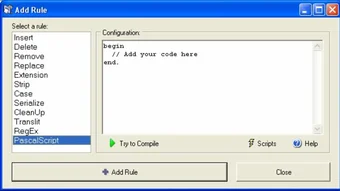
One of the standout features of ReNamer Lite is its robust set of 12 customizable renaming rules, each designed to handle specific file organization tasks. Whether you're renaming a batch of images from a recent trip, standardizing document filenames for a project, or preparing media files for a video edit, ReNamer Lite has the tools to make it seamless. The software supports actions like inserting text at the beginning or end of filenames, removing specific characters or sequences (such as “(copy)” or “temp”), replacing text patterns, and even changing file extensions in bulk. For users who need sequential numbering, the tool offers options to add numbers in ascending, descending, or custom formats (e.g., 001, 002, 003).
Another standout feature is the ability to use regular expressions (regex) for advanced users. This allows you to define complex patterns to match and replace file names based on specific structures—perfect for renaming files with inconsistent naming conventions. The rule engine is intuitive, with clear labels and real-time previews.
You can stack multiple rules in any order, and the tool applies them sequentially, giving you full control over the final output. For example, you could first remove unwanted characters, then insert a date prefix, and finally number the files—all in one go. This level of customization ensures that ReNamer Lite adapts to your workflow, not the other way around.
Moreover, the software remembers your most-used rules, so you can quickly apply them to new batches. This feature saves time and reduces repetitive effort, especially if you frequently organize files in similar ways. Whether you're a student, photographer, or office worker, ReNamer Lite’s flexible rule system ensures you can automate even the most complex renaming tasks with confidence.
Easy to Use with a Clean, Intuitive Interface
ReNamer Lite shines not only in functionality but also in usability. The software features a clean, two-pane layout that separates file management from rule configuration—making the entire process intuitive and distraction-free. On the left side, you’ll see a list of your selected files, complete with their current names and extensions. On the right, the rule editor allows you to build and adjust renaming commands with ease. This split-screen design ensures you can always see what’s happening to your files in real time.
Adding files is as simple as dragging and dropping them into the interface, or using the built-in file browser. Once files are loaded, you can instantly preview how they’ll be renamed based on your selected rules. This preview feature is crucial—it prevents accidental errors and gives you the chance to fine-tune your settings before applying changes. You can also test rules on a small sample set before running them on an entire folder, which is especially helpful when working with important or irreplaceable files.
For beginners, the interface is welcoming and self-explanatory. Tooltips and clear labels guide you through each step. Advanced users appreciate the depth of control, including the ability to save and load rule sets for future use.
The software also supports batch processing, meaning you can rename hundreds or even thousands of files in a single operation. Performance remains smooth, even with large file sets, thanks to efficient memory handling and minimal background overhead. Overall, ReNamer Lite strikes the perfect balance between simplicity and power—making it accessible to everyone while still offering advanced capabilities.
Compatibility & Installation – Fast, Secure, and Hassle-Free
ReNamer Lite is designed exclusively for Windows operating systems, including Windows 7, 8, 10, and 11. It is a portable application, which means you don’t need to install it—just download the ZIP file, extract it, and run the executable. This makes it ideal for use on work computers, laptops, or even USB drives without leaving traces behind. The portable nature also ensures that you can carry your preferred renaming settings with you wherever you go.
Installation is straightforward: visit the official website, download the free version, extract the archive, and launch ReNamer Lite.exe. No admin rights are required, and the tool runs without installing additional dependencies. This makes it a secure choice, especially in corporate environments where software restrictions are common. The file size is minimal—under 10 MB—so it downloads quickly and doesn’t take up valuable disk space.
Regular updates are released to fix bugs, improve performance, and add minor enhancements. The developers maintain a transparent update log, so users can track changes. Because it’s free and open to public use, ReNamer Lite remains a trusted tool among users who value both security and efficiency. Whether you're renaming a few files or managing a massive media archive, the software handles it all with speed and reliability. With no ads, no telemetry, and no hidden costs, ReNamer Lite delivers a clean, focused experience.
Pros and Cons: Is ReNamer Lite Right for You?
- Pros:
- Free to download and use with no hidden costs
- Lightweight and portable—no installation required
- 12 powerful, customizable renaming rules with real-time preview
- Supports drag and drop for fast file addition
- Advanced regex support for complex renaming tasks
- Safe and secure—no ads, no telemetry, no malware
- Perfect for organizing photos, documents, and media files
- Cons:
- Only available for Windows (no Mac, iOS, or Android version)
- Limited to file renaming—no bulk editing for metadata or content
- Interface is functional but not highly customizable in appearance
Frequently Asked Questions (FAQ)
Is ReNamer Lite completely free?
Yes, ReNamer Lite is 100% free to download and use. There are no trial periods, subscription fees, or hidden charges. The software is supported by its developers through donations and community feedback.
Can I use ReNamer Lite on Mac or Linux?
Currently, ReNamer Lite is only available for Windows. There is no official version for Mac, Linux, iOS, or Android. However, users on other platforms can explore alternatives like Bulk Rename Utility (Windows) or command-line tools like rename (Linux/macOS).
Does ReNamer Lite support renaming files in subfolders?
Yes, ReNamer Lite can scan and rename files in subdirectories. Simply check the “Include subfolders” option in the file selection window, and the tool will process all files within the selected directory and its nested folders.
How do I undo a renaming operation?
ReNamer Lite does not include a built-in undo function. However, you can prevent errors by using the preview feature to review changes before applying them. It’s recommended to back up your files before performing bulk renames.
Can I save my renaming rules for future use?
Yes, you can save your custom rule sets as .ren files. This allows you to reuse them across different projects or share them with others. Simply go to File > Save Rules and choose a location to store your configuration.
Final Verdict: A Must-Have Tool for Windows Users
If you’re looking for a free, secure, and efficient file renaming tool for Windows, ReNamer Lite delivers exceptional value. Its combination of powerful rules, intuitive interface, and portability makes it a top choice for both casual users and professionals. Whether you're preparing a presentation folder, organizing a photo collection, or streamlining your digital workflow, this software saves hours of manual labor.
While it’s limited to Windows, its performance, reliability, and lack of bloat make it a standout in the crowded field of file management tools. The ability to preview changes, use regex, and save rule sets adds a layer of professionalism that many paid tools lack.
Download ReNamer Lite today and transform your file organization experience—effortlessly, safely, and for free.







